
Agentic AI Security: Tool Poisoning and Audit Trails
Explore agentic AI security risks, including MCP tool poisoning, and learn how governance, permissions, approvals, and audit trails reduce exposure.
Data Breach has always been a cause of concern for various commercial organizations. As the organizations grow, they set practices and procedures to secure their information from external threats. With changing times, information security has also become an integral part for non-profits. Since they handle the data of the most vulnerable population, they also take responsibility of protecting these communities from any kind of data breach. Leaders around tech are coming up with ways to avoid security breaches in non-profit sector with a plethora of new CRM systems.
Salesforce helps non-profits by coming up with innovative and necessary steps that provide a comfortable space for non-profit organizations to centralize their data. With centralizing the data for non-profits, Salesforce also owns the responsibility to protect constituents’ data. With SaaS, Salesforce ensures the security and integrity of the platform, but the non-profit organization also shares the responsibility of allowing the people within their organization with whom they are sharing this data.
When we talk about nonprofit data security that is provided by salesforce, we discuss it in terms of access to information.
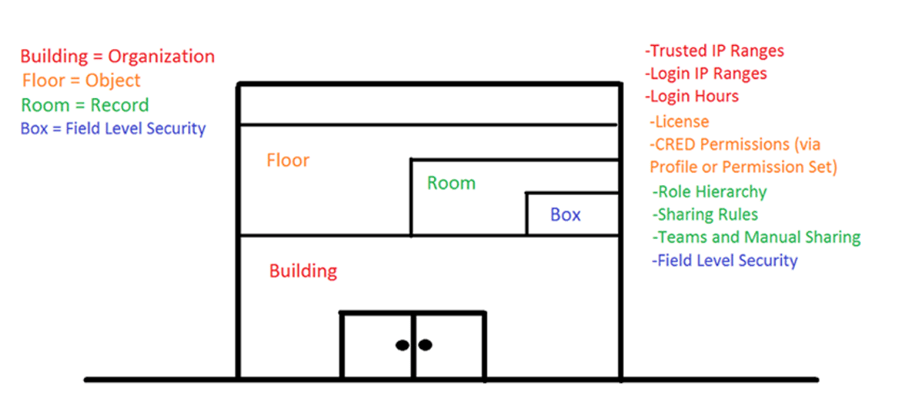
Image Source = Google | Image By – Salesforce
Let’s take an example of a building. To enter the building itself, would be the first step of providing access. This is done through the salesforce initial login page. A person can either be permitted to enter this building or denied access. Once a person is able to enter the building, we decide whether or not he/she has access to certain floors. Floors can be taken as the different types of data that is being stored in the organization. It can be financial data, demographical data of the constituents, etc.
If the person gets access to a floor, then we have to decide what sort of rooms he/she can enter. The room here represents the information of an individual. Within that room comes granular data such as boxes. Boxes represent the attributes of an individual. Do you have access to email of a person, or could you only see their name, address, etc?
Compliance is a set of practices and procedures that is being kept by the state or a country where you are storing the data. When we talk about compliances, two major ones stand out – GDPR and HIPPA.
The GDPR is a new comprehensive data protection law (in effect May 25, 2018) in the EU that strengthens the protection of personal data in light of rapid technological developments, increased globalization, and more complex international flows of personal data.
The HIPAA Privacy Rule provides federal protections for personal health information held by covered entities and gives patients an array of rights with respect to that information. HIPAA is another regulation your nonprofit may encounter, especially if your nonprofit works in human services.
Although, we flag major breaches and external parties to be the major cause of such incidents. At ground level, we see that data loss occurs due to smaller errors. Based on our 2020 State of Salesforce Data Protection Survey, human error is the leading cause of data loss within the Salesforce ecosystem, making up just less than half of all incidents.
1. Enable multifactor authentication: Multi-factor authentication (or MFA) adds an extra layer of protection against common threats like phishing attacks, credential stuffing, and account takeovers. Implementing MFA is one of the most effective ways your company can increase the security of your Salesforce data.
2. Set Login IP Ranges: With Login IP ranges you can stop unauthorized access to your system. You can make it mandatory for a user to login only from designated IP addresses – company network.
3. Decrease session timeouts: Users sometimes leave their computers unattended or they don’t log off. You can protect your applications against unauthorized access by automatically closing sessions when there is no session activity for a period of time.
4. Password policies: Strong password security is an important step in protecting your Salesforce accounts and Salesforce recommends these best practices:
5. Auditing and logging: Audit logs provide a chronological record of all activities in your system, such as logins, permissions changes, and addition/deletion of records. They are used to detect anomalous use of the system, and are critical in diagnosing potential or actual security issues.
We recommend that you set up audit trails for your Salesforce instance, and perform regular audits to monitor for unexpected changes or usage trends.
To read more about the said practices and for more informative blogs around salesforce, reach out to us
In today’s fast-paced business environment, staying ahead of the competition requires not only efficient operations but also a deep understanding of customer needs. Salesforce, a leader in customer relationship management (CRM), continues to innovate with tools that empower businesses to achieve both. One such tool that has gained significant traction in recent years is Einstein Next Best Action (NBA).
This powerful automation tool leverages artificial intelligence (AI) to provide personalized recommendations, guiding users to make data-driven decisions that enhance customer engagement and business efficiency.
Einstein Next Best Action is a Salesforce feature that uses AI to deliver real-time recommendations to users within the platform. These recommendations, or “actions,” are based on a variety of data points, including customer interactions, past behaviours, and predefined business rules. By analysing this data, Einstein NBA suggests the most relevant and effective actions for users to take, whether it’s reaching out to a customer, offering a discount, or following up on a previous interaction.
The beauty of Einstein Next Best Action lies in its ability to adapt to the unique needs of each business. Whether you’re in sales, service, or marketing, Einstein NBA can be tailored to provide insights that align with your specific objectives, making it a versatile tool for a wide range of industries.
Einstein Next Best Action is packed with features designed to optimize decision-making and enhance customer interactions.
The adoption of Einstein Next Best Action can bring a multitude of benefits to your business.
Implementing Einstein Next Best Action is a strategic move that can yield significant returns for your business. To get started, it’s important to first define your business objectives and understand how the tool can support them. From there, you can work with your Salesforce administrator or a certified Salesforce consultant to customize the tool to meet your specific needs.
As you begin using Einstein NBA, it’s crucial to continuously monitor and refine the recommendations it provides. Regularly reviewing the tool’s performance will help you optimize its effectiveness and ensure that it continues to deliver value as your business evolves.
One real-life example of Salesforce automation in action comes from “Random”, a company that designs and sells personalized sneakers. Random experienced significant domestic growth in their online retail business and decided to expand into international markets. To manage the increased complexity of launching in multiple markets, they needed to set up efficient processes within Salesforce, including automated discount applications based on unique regional criteria.
As the admin, John Doe, was creating sales processes for each international market. Each region had different criteria for discounts, which could be based on factors like customer demographics, order size, or seasonal promotions. Manually tracking and applying these discounts would have been a time-consuming and error-prone process.
The sales team requested an automated system that would reduce manual work and ensure accuracy. John needed to find a way to automate the discount process so that discounts were applied seamlessly and only when the predefined criteria for each region were met.
The Solution: Einstein Next Best Action and Flow
To automate this process, John turned to Salesforce’s Einstein Next Best Action and Flow Builder tools.
The flow John designed allowed her to automatically apply the discounts, update records, and send emails to confirm that the discount was granted—all in real time. This automation greatly reduced the risk of human error and sped up the checkout process.
The Results
By implementing this automated solution, Random was able to:
Ultimately, this automation helped” Random” successfully launch their international expansion while maintaining a smooth and efficient sales process. This case demonstrates how Salesforce automation can streamline operations, enhance accuracy, and enable businesses to scale effectively.
Salesforce automation tools in 2024 continue to revolutionize business processes by streamlining operations, reducing manual effort, and enhancing efficiency. Whether it’s the versatile Flow Builder, user-friendly Process Builder, powerful Apex, or intelligent Einstein Next Best Action, these tools offer a comprehensive solution for automating complex workflows, improving accuracy, and driving business growth. By leveraging these tools, organizations can stay competitive in an ever-evolving market while focusing on strategic, value-added activities. Embracing Salesforce automation is not just about efficiency but about enabling innovation and scalability in a fast-paced business environment.
Get Started
Share a few details about your goals: a Mirketa consultant will follow up within one business day.
 Certified Partner
 SOC 2 Certified
 HIPAA Ready
 Enterprise Ready